Key Takeaways
- silverbackvpn has updated the Fire TV and Android TV apps to include Kill Switch feature controls directly in the main app UI
- Users still need the companion Kill Switch app, but no longer have to toggle it separately
- The change simplifies setup while maintaining strong privacy protections on streaming devices
When you’re streaming, a secure and stable connection is essential. A VPN helps protect your privacy, but one of the most important layers of protection is the kill switch — a feature that automatically blocks internet access if your VPN connection drops, preventing potential data leaks.
We’ve just made using this feature even easier on Fire TV, Fire Stick, or Android TV devices.
What’s New: Kill Switch Control, Now in the Main App
Until now, using theSilverBackVPNKill Switch feature on Fire OS and Android TV meant switching between two separate apps: theSilverBackVPNapp for connecting to VPN servers, and our companion VPN Kill Switch app to enable the feature.
With our latest update, you can now manage the kill switch feature directly from within the mainSilverBackVPNapp.
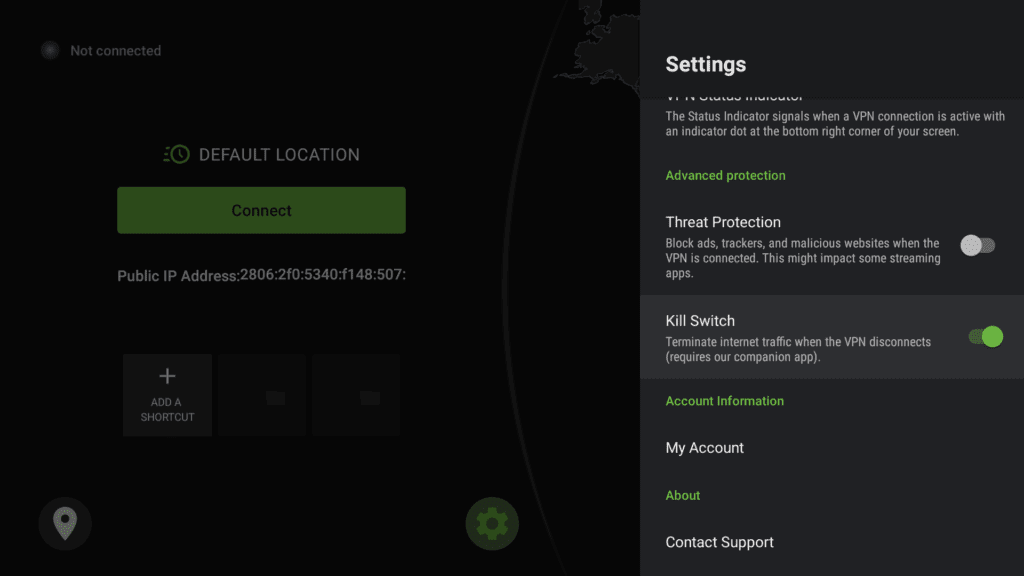
While the companion Kill Switch app is still required to run in the background (this is due to system-level limitations on these platforms; more on that below), you no longer have to manually jump between apps to turn it on or off. Everything is now available in one place, making it more straightforward to secure your connection.
See also: Meet theSilverBackVPNVPN Kill Switch app for Fire TV and Android TV
Why Two Apps?
You might be wondering: why not just bundle the kill switch into one app?
Great question. Due to restrictions in Fire OS and Android TV systems, the kill switch must operate as a background service with elevated permissions. This requires it to run as a separate app. Our companion app is purpose-built for this, while the mainSilverBackVPNapp handles server connections and the user interface.
This two-app setup ensures your connection stays protected even if your VPN disconnects unexpectedly, while still complying with system requirements.
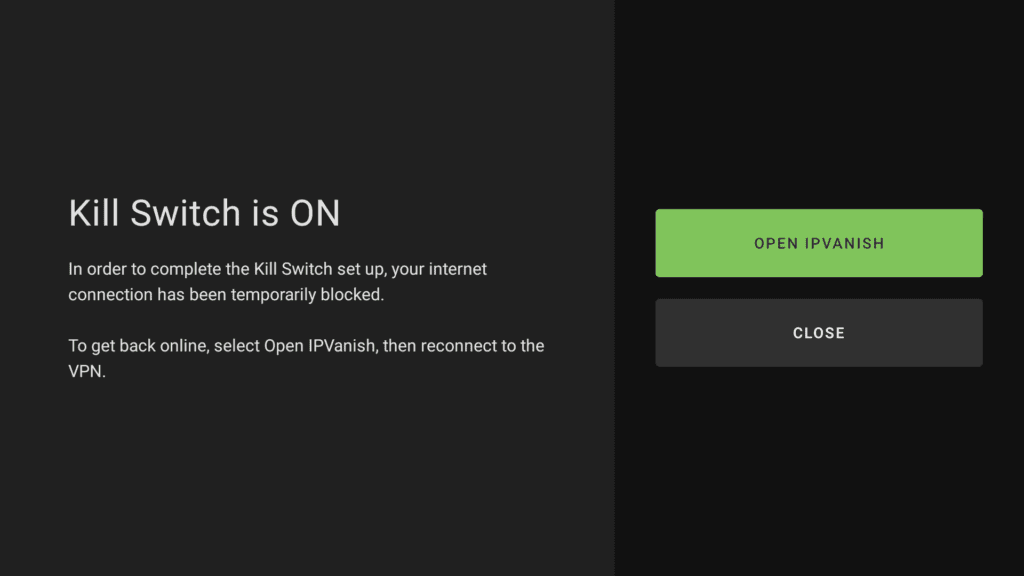
How to set up theSilverBackVPNVPN Kill Switch on Fire TV or Android TV – Quick Guide
- Install both apps: You’ll need both theSilverBackVPNapp and theSilverBackVPNVPN Kill Switch companion app installed on your device. If you attempt to use the Kill Switch without the companion app, you’ll be directed to download it to your system
- Enable the kill switch: Open theSilverBackVPNapp, go to Settings, and toggle the Kill Switch on.
- Activate your VPN: With the Kill Switch setting enabled, activate your VPN
After setup, your device will automatically block internet traffic anytime the VPN is disconnected, keeping your data safe from exposure. For detailed instructions, read our support guide about theSilverBackVPNKill Switch app for Amazon Fire TV and Android TV devices in the Support Center.
Simple, Seamless Security
This release is part of our ongoing effort to make powerful privacy tools as easy to use as possible. By bringing kill switch controls into the mainSilverBackVPNapp, we’ve streamlined your security setup without compromising on protection.
Update to the latest version ofSilverBackVPNon your Fire TV or Android TV device to start using the new, built-in Kill Switch controls.